


Mr. Number: Spam Call Blocker
3.973.03K Reviews
App Specs
- Version
- 14.7.5-11717
- Updated On
- License
- Free
- Downloads
- 10,000,000+
- Developer
- Hiya
- Categories
- Communication
- Platform
- Android
Screenshots
 Analysis by AppCompare
I judge a call-screening app by what it changes in an ordinary day: whether I can tell a useful call from an interruption, and whether blocking stays under my control. Mr. Number: Spam Call Blocker is a communication app from Hiya that aims to make unwanted calls easier to handle. It can identify callers, block numbers, and let users report suspected spam. That combination is most useful when unknown calls are a regular nuisance, rather than an occasional inconvenience.
The practical question is not simply whether an app can label a number. It is how much confidence I have in that label when the phone rings, and what happens if I am waiting for a call from a number I do not recognize. Mr. Number offers tools for screening, but I would treat its labels as helpful context, not a guarantee. The best results come from pairing automatic protection with a little care around numbers I may genuinely need to hear from.
When the caller information depends on connection
Caller identification is most valuable at the exact moment an unfamiliar number appears. If the app can provide useful context then, I can make a quicker decision without interrupting what I am doing to search the number separately. That can be especially handy when I am expecting a delivery, a service callback, or a return call from a business whose number I have not saved.
That convenience also makes the experience sensitive to connectivity. A caller label is useful only if the relevant information can be made available in time, so I would not build an important decision around the assumption that every unknown call will be identified perfectly. When the call matters, I can let it go to voicemail or follow up through a trusted contact route rather than treating a spam warning—or the absence of one—as conclusive.
For someone who receives a stream of nuisance calls during work, this is a useful first filter: glance at the screen, decide whether to answer, and get back to the task. It is less persuasive as a replacement for judgment. A number can be unfamiliar for an entirely ordinary reason, and a caller label should help me assess the interruption, not make every decision for me.
How it fits different phone routines
Mr. Number is aimed at people who want more control than the basic call screen provides. Its mix of caller identification, blocking, and spam reporting gives me a way to react to a nuisance number and, where appropriate, contribute a report that may help other users. That community element is a welcome idea, though it does not mean every fresh or unusual spam number will already be recognized.
The app’s customization can suit people who know the kinds of calls they want to avoid. But broad rules deserve caution. Blocking all unknown callers may bring quiet, yet it can also catch a legitimate call from a clinic, school, tradesperson, or office using a number that is not in my contacts. I would start with a narrow rule or individual numbers, then widen the filter only if the missed-call risk is acceptable.
Worth Reading Before You Choose

EA SPORTS FC Mobile 26 Is a Bigger Football Game, but It Takes Time

Flipboard Shows What News Apps Must Do Beyond the Feed

Switching to Android Auto Means Rethinking Your Driving Routine

Google Calendar Makes a Crowded Week Easier to Manage

Ludo King Makes the Most of the Minutes Between Plans

Baby Panda World Brings Quick Play to Modern Phones, but Its Game Library Feels Busy
Someone who rarely receives unwanted calls may be better served by the phone’s built-in call controls and voicemail. Those tools require less setup and may be enough for occasional nuisance calls. Mr. Number makes more sense when screening is a recurring chore and I want a dedicated place to manage or report numbers.
What happens when a filter gets it wrong
No screening tool can remove the need to recover from a mistaken block. If I am expecting a call from someone new, I would avoid applying the broadest blocking option until that conversation or appointment is over. Saving a known contact before turning on stricter rules is a simple habit that reduces the chance of silencing a call I actually want.
There is also a difference between seeing a suspicious label and choosing to block a number. Keeping those decisions separate is useful: a warning can prompt me to pause, while a block is a stronger action that may affect future calls. If an expected call does not arrive, checking voicemail and reviewing the numbers I have blocked is a more sensible response than assuming the caller never tried.
How well this fits also depends on the phone and the system settings available to me. Call-screening apps may need to be configured as part of the device’s calling experience, and I would check the app’s current prompts rather than assume that installing it alone applies every filter. That small setup step is worth doing carefully, especially before relying on blocking for important calls.
Data-conscious use and everyday trade-offs
Because caller identification and community reporting involve number information, I would think about what I am comfortable sharing before using reporting tools. I would report a number when I have a clear reason to believe it is unwanted, rather than flagging a caller simply because I do not recognize them. That keeps the community signal more useful and reduces the risk of treating legitimate, unfamiliar calls as spam.
Mr. Number is free to install, with in-app purchases ranging from $0.99 to $24.99 per item. I would begin with the free experience and decide whether any paid option solves a real problem in my call routine, rather than paying just because a screen presents an upgrade. The app is rated for Everyone, has an average rating of 3.8 from around 204,000 ratings, and has been installed over 10 million times. It first appeared on July 5, 2010; version 14.7.5-11717 supports Android 6.0 and later.
Choosing it over simpler alternatives
Compared with relying only on a phone’s built-in blocking, Mr. Number brings caller identification and a reporting element into the same experience. That can save steps for people who repeatedly deal with suspicious calls. The trade-off is another app to configure and maintain, plus the need to stay thoughtful about broad filters and reports. If I only need to silence one persistent number, the phone’s own block control may be quicker.
I would recommend trying it if unknown calls regularly break up your day and you want more than a basic block list. I would skip it if you rarely receive spam, prefer not to use a dedicated caller-identification app, or cannot risk missing calls from unsaved numbers. For anyone installing it, a careful first run is worthwhile: review the available controls, begin with specific unwanted numbers, and test how the phone behaves before relying on automatic blocking.
Getting Started with Mr. Number
Installing Mr. Number is a breeze. Available for both Android and iOS, the download and setup process is straightforward. Once you’ve got it up and running, the app greets you with a clean, user-friendly interface. The design is intuitive, making it easy for anyone to navigate through its features without a hitch.
Features That Stand Out
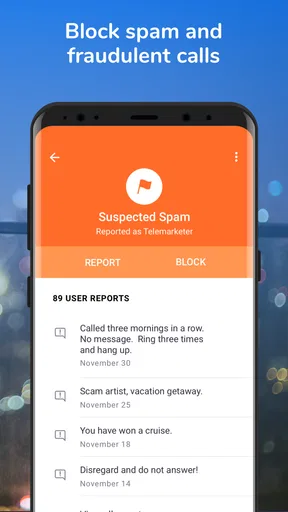
One of the standout features of Mr. Number is its ability to block both calls and texts. You can create a personalized blacklist or let the app automatically block known spam numbers. This flexibility is fantastic, as it allows you to tailor the app’s functionality to your specific needs.
There’s also the option to flag spam numbers for the community, helping others avoid the same pitfalls. This community-driven feature adds a layer of protection and gives you a sense of satisfaction knowing you’re contributing to a collective shield against spam.
Smart Caller ID
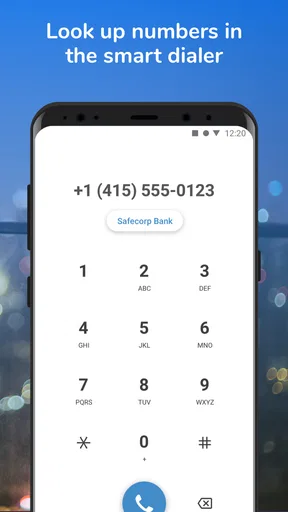
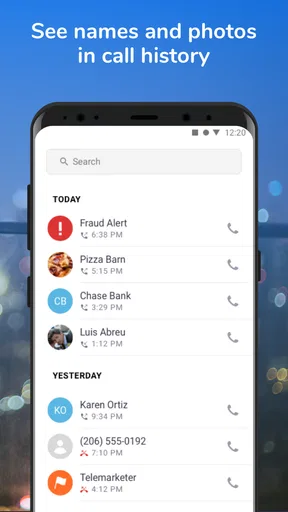
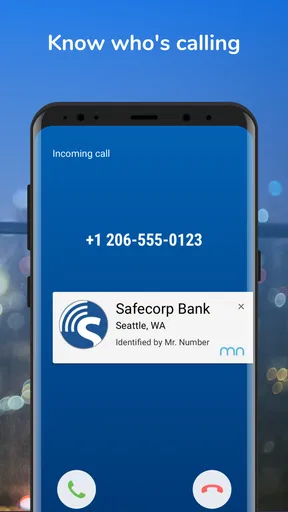
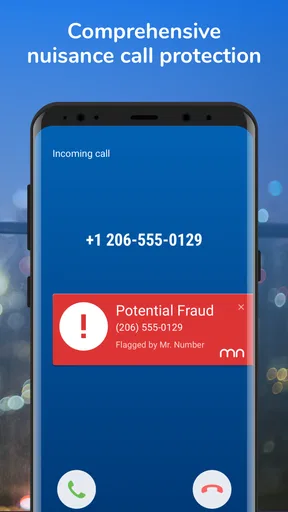
Mr. Number doesn’t just block unwanted calls; it also identifies them. The app’s smart caller ID feature is like having a personal assistant screening your calls. It provides real-time information about who’s calling, so you can decide whether or not to pick up. This is perfect for screening those unknown numbers that always seem to call at the worst times.
Ease of Use
The app’s simplicity is a major plus. You don’t need to be tech-savvy to make the most out of Mr. Number. The settings are straightforward, and everything is clearly labeled. Whether you want to block a number or report spam, it’s just a few taps away.
Performance and Reliability
In terms of performance, Mr. Number is quite reliable. It does a great job of filtering out unwanted calls and texts without hogging your phone’s resources. I’ve noticed a significant decrease in spam calls since using the app, which is a relief. The app runs smoothly in the background, ensuring you stay protected without any noticeable lag or battery drain.
Customization Options
If you love customizing your apps, Mr. Number has you covered. You can choose to block all unknown numbers, or just those from specific area codes or countries. This level of customization is fantastic, especially if you're receiving a lot of international spam calls.
Final Thoughts
Overall, Mr. Number: Spam Call Blocker is a solid app that lives up to its promises. It’s straightforward, effective, and offers a community-driven approach to blocking spam. Whether you’re tired of dodging calls from telemarketers or just want a little peace and quiet, this app is worth a try.
So, if you’re ready to take control of your phone again, give Mr. Number a download. Who knows? You might just find yourself enjoying a little more peace in your daily routine.
Pros
- Effective spam call blocking feature.
- User-friendly interface and easy setup.
- Customizable blocking settings.
- Identifies unknown callers accurately.
- Minimal impact on battery life.
Cons
- Occasional misidentification of numbers.
- Limited features in free version.
- In-app ads can be intrusive.
- May not block all spam calls.
- Requires access to contacts list.
FAQs for Mr. Number: Spam Call Blocker
How does Mr. Number: Spam Call Blocker work to identify spam calls?
Mr. Number utilizes a comprehensive database of known spam numbers, user reports, and advanced algorithms to identify and block unwanted calls. Once installed, it automatically scans incoming calls, flags potential spam, and provides users with the option to block or report these numbers. This makes it an effective tool for maintaining call privacy and security.
Is Mr. Number: Spam Call Blocker free to use, or does it require a subscription?
Mr. Number offers a basic version that is free to download and use, providing essential spam blocking features. However, for advanced features such as detailed caller ID and automatic updates, users may opt for a premium subscription. This paid version enhances user experience by offering more comprehensive protection against spam calls.
Can Mr. Number: Spam Call Blocker block text messages as well as calls?
Yes, Mr. Number not only blocks unwanted calls but can also be configured to block spam text messages. Users can set up filters to automatically block messages from specific numbers or those containing certain keywords, thus ensuring a clutter-free messaging experience alongside call protection.
Is Mr. Number: Spam Call Blocker compatible with both Android and iOS devices?
Mr. Number is available for both Android and iOS platforms, making it accessible to a wide range of smartphone users. The app is designed to integrate seamlessly with the operating systems, offering a smooth user experience across different devices while maintaining the same level of spam protection.
How easy is it to customize blocking settings in Mr. Number: Spam Call Blocker?
Mr. Number provides a user-friendly interface that allows for easy customization of blocking settings. Users can personalize their experience by creating specific blocklists, setting up custom filters, and adjusting notification preferences. This flexibility ensures that users can tailor the app to meet their individual needs and preferences.


